


Description
Download 1890CursoMecaNet CursoMecaNet Collection – Free typing tutor, learn to type fast
The 1890CursoMecaNet CursoMecaNet Collection is a comprehensive, bilingual (Spanish / English) typing course designed for absolute beginners and anyone who wants to boost their keyboard speed without looking at the keys. Delivered as a secure PC‑software application, it combines 20 structured lessons, more than 200 practice exercises, and a variety of engaging games that reinforce proper finger placement and rhythm. Users can track progress, choose one‑hand or two‑hand modes, and benefit from a clean, ad‑free interface that works on modern Windows and macOS environments. Whether you are a student, a professional, or a senior citizen seeking digital independence, this free tool provides a step‑by‑step roadmap to become a confident, efficient typist.
Key Features and What Sets CursoMecaNet Apart
- 20 core lessons covering home‑row fundamentals, punctuation, numbers, and special characters.
- Over 200 incremental exercises and typing games that turn learning into fun competition.
- Bilingual support – full UI and instructional content available in Spanish and English.
- Progress‑saving system that records speed, accuracy, and lesson completion for each user.
- Flexible hand‑mode selection: one‑hand (left or right) or two‑hand training.
- Customizable difficulty levels and real‑time feedback on keystroke errors.
- Secure offline installation – no internet connection required after download.
- Regular free updates that add new games, lesson packs, and performance analytics.
- Compatibility with Windows 10/11 and macOS 10.15+ (Catalina and later).
- Lightweight footprint (< 30 MB) ensuring fast download and minimal system impact.
Installation, Setup, and Everyday Usage
Getting started with the 1890CursoMecaNet CursoMecaNet Collection is straightforward and designed for users of all technical skill levels. Follow these steps to ensure a smooth installation and immediate access to the learning environment:
Step 1 – Secure Download
Visit the official website or trusted software repository and click the “Download Free” button. The installer is signed with a digital certificate, guaranteeing a safe, malware‑free package.
Step 2 – Run the Installer
For Windows, double‑click the .exe file; for macOS, open the .dmg and drag the app to the Applications folder. The wizard will guide you through standard prompts (license agreement, destination folder, and optional desktop shortcut).
Step 3 – Initial Configuration
On first launch, you’ll be asked to select your preferred language (Spanish or English) and the hand mode you wish to practice. The software automatically creates a user profile where your progress is stored locally.
Step 4 – Navigating Lessons and Games
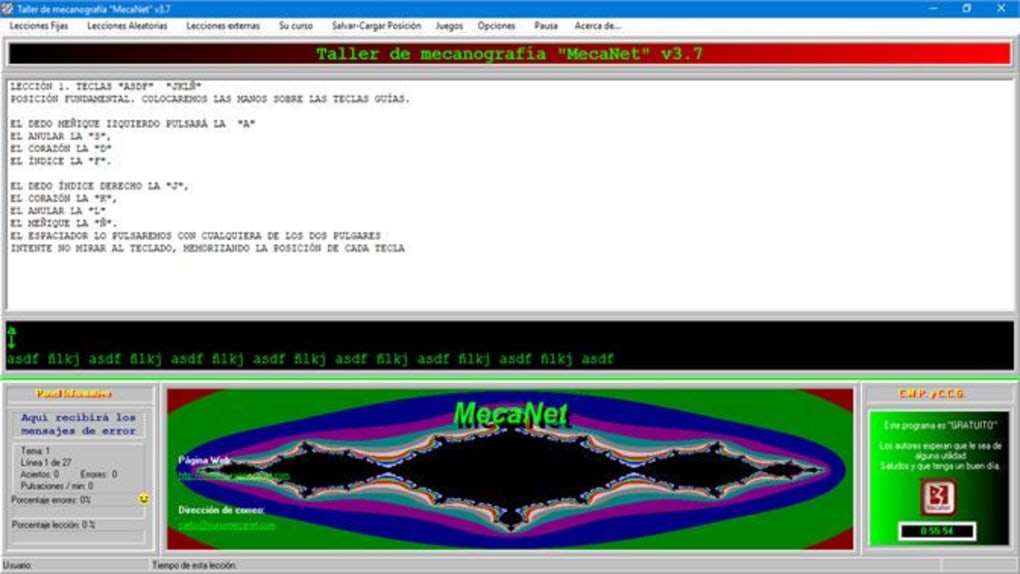
The main dashboard displays a clear progress bar for each of the 20 lessons. Clicking a lesson opens a detailed view with a brief tutorial, practice text, and a “Start Exercise” button. After completing a lesson, you unlock the next one and gain access to a related game that reinforces the same skill set.
Step 5 – Monitoring Performance
Each session generates a concise report showing words‑per‑minute (WPM), accuracy percentage, and error types (e.g., missed keys, premature hits). These metrics are stored in the profile and can be exported as CSV for deeper analysis or shared with a teacher.
Overall, the user experience is intuitive: bright icons, clear navigation, and responsive controls make the learning journey enjoyable rather than intimidating.
Compatibility, System Requirements, and Pros vs. Cons
The 1890CursoMecaNet CursoMecaNet Collection runs on the following operating systems:
- Windows 10, Windows 11 (64‑bit)
- macOS 10.15 Catalina and later (Intel & Apple Silicon)
Recommended hardware includes at least 2 GB RAM, 500 MB free disk space, and a standard QWERTY keyboard. The software does not require an internet connection after installation, making it ideal for offline learning environments such as schools or remote cabins.
Pros
- Completely free with no hidden in‑app purchases.
- Dual‑language interface expands accessibility for Spanish‑speaking users.
- Extensive lesson library (> 200 exercises) ensures progressive skill development.
- Gamified approach keeps motivation high and reduces learning fatigue.
- Offline‑first design protects user privacy and works without bandwidth.
- Regular updates add fresh content without extra cost.
- Lightweight installer and low system demand.
Cons
- No native mobile version (Android/iOS) – limited to desktop platforms.
- Interface, while functional, feels dated compared to modern SaaS typing tutors.
- Advanced typists may outgrow the lesson set quickly; no professional‑level drills.
- Progress sync is local only; no cloud backup across devices.
- Limited customization of lesson content beyond the preset curriculum.
Frequently Asked Questions (FAQ)
Is the 1890CursoMecaNet CursoMecaNet Collection truly free?
Yes, the software is completely free to download and use. There are no hidden fees, subscriptions, or in‑app purchases. All lessons and games are included in the initial package.Can I use the program on a Mac with Apple Silicon (M1/M2) chips?
Absolutely. The macOS version is compiled as a universal binary, meaning it runs natively on both Intel and Apple Silicon processors without any performance penalties.How does the progress‑saving feature work?
When you complete a lesson or game, the application writes your WPM, accuracy, and lesson status to a local profile file stored in your user directory. This file is automatically loaded each time you start the program, allowing you to resume exactly where you left off.Is there a way to export my results for a teacher or employer?
Yes. The “Export Report” button on the dashboard creates a CSV file containing all recorded metrics. This file can be opened in Excel, Google Sheets, or any spreadsheet program for easy sharing.Do I need an internet connection after the initial download?
No. The application is fully offline‑capable. Once installed, you can work through lessons, play games, and view your progress without any network access. Internet is only required for checking updates.Conclusion – Should You Download 1890CursoMecaNet CursoMecaNet Collection?
The 1890CursoMecaNet CursoMecaNet Collection delivers exactly what its name promises: a complete, beginner‑friendly mecanography curriculum wrapped in a secure, ad‑free desktop application. Its bilingual support, extensive lesson count, and engaging games make it an excellent choice for students, professionals, and seniors who need a solid foundation in touch typing. While power users may eventually outgrow the lesson set and the lack of a mobile version could be a drawback for on‑the‑go learners, the free price tag, offline capability, and regular updates provide outstanding value for anyone starting from scratch.
If you’re ready to replace hunt‑and‑peck typing with fluid, accurate keystrokes, click the download button below, install the software, and begin your journey toward a faster, more confident digital workflow.
Download 1890CursoMecaNet Now – Free & Secure
The CursoMecaNet Collection offers a surprisingly rich typing curriculum for a free desktop app. Its bilingual interface and extensive practice set make it a top pick for beginners, though advanced users may look for more sophisticated drills. Overall, a solid, secure, and enjoyable way to learn touch typing.
Guides & Tutorials for 1890CursoMecaNet CursoMecaNet Collection
How to install 1890CursoMecaNet CursoMecaNet Collection
- Click the Preview / Download button above.
- Once redirected, accept the terms and click Install.
- Wait for the 1890CursoMecaNet CursoMecaNet Collection download to finish on your device.
How to use 1890CursoMecaNet CursoMecaNet Collection
This software is primarily used for its core features described above. Open the app after installation to explore its capabilities.
User Reviews for 1890CursoMecaNet CursoMecaNet Collection 0
No reviews found





